

Posted At: 4/6/2026
Author: Sandesh Bhandari
learning rust lang
1. Introduction
I have been trying to learn Rust for a while now, as I always ended up in it. Like: Github projects and repositories that interest me, trying to understand how to build scalable and reliable systems, low level controls for example on inferences runtime or good hardware and GPU integrations. So, I decided it was better to understand it early or at least start rather than wait till much later.
Around the time I was starting to learn rust, my roommate left for Chicago for easter break, before leaving he asked me what I was doing for break, Since we are in DSA class together. I told him I have been learning to build some projects in Rust, and also currently strengthening my concepts and understanding. I talked about memory efficiency, performancy and how the language forces you to thing more carefully as we write, and even said I might like it more than python. He said, ‘bro they are all the same.’ I said, ‘no, she is different ’. Cringey, lol.
Anyway, I kept building projects in Rust over the next few days, applying what I had learned and reinforcing my concepts. I’d already spent time with Python and JavaScript, and just enough C++ to understand that memory management is handled very differently in each language. Python abstracts it entirely and JavaScript gives you flexibility with almost no constraints. C++ on the other hand gives you full manual control with no guardrails, and Rust sits in its own category. We get the performance of C++ without undefined behavior, because the compiler enforces memory safety. It felt challenging at first, but over time I came to prefer it as I actually like the fact that everyone in the community tends to follow the same standards for code for Rust, which is a really nice thing.
2. Setup
I set up Rust using rustup for toolchain management. I used VS Code as my editor, with the rust-analyzer extension for autocomplete, inline error messages, and type hints. The project structure was one Cargo project per concept, so it could be well managed and accessible and connected to GitHub so I could save my progress.
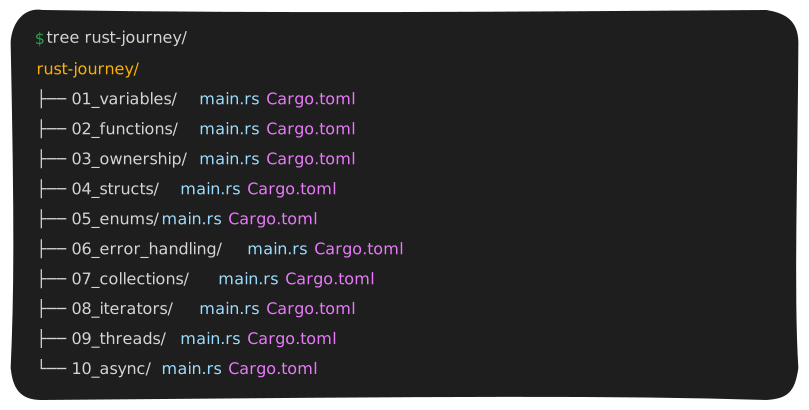
Figure: One folder per concept. Each has its own Cargo.toml and main.rs.
Cargo is the Rust build and package manager. Running cargo new creates a project and cargo run compiles and executes it. Dependencies, tests, and builds all go through this one tool, which keeps things simple. One thing though, add **/target/ to your .gitignore before your first push. That folder can get huge, hundreds of megabytes, and once it’s tracked you’ll have to go back and untrack it manually so it would be way easier to just ignore it from the start.
I used the rust-analyzer extension to get inline error messages, type hints, and faster feedback. It underlines errors as you type and explains them inline, which makes the feedback loop much faster than the usual write-compile-debug cycle.
3. Concepts Covered
3.1 Variables and Mutability
In Rust, every variable is immutable by default. Once you set a value, it stays that value. To allow a variable to change, you mark it explicitly with mut. This is the opposite of Python, where any variable can be reassigned at any time without declaration.
1let name = "Sandesh"; // immutable - cannot be changed
2let mut age = 20;     // mutable - can be changed
3age = 21;             // fine because of mut
4// name = "someone"; // compile error - name is immutable
What this is used for
Immutability by default prevents accidental changes to data. In a large codebase, knowing a variable cannot change unless it is explicitly marked mut makes the code easier to reason about. When you see mut, it signals intent: this variable is supposed to change. Without it, you can be confident it will not.
3.2 Functions
Functions in Rust use the fn keyword. Unlike Python's def, you have to declare the type of every argument and the return type. The return type comes after an arrow. There is no return keyword. The last expression without a semicolon is returned automatically.
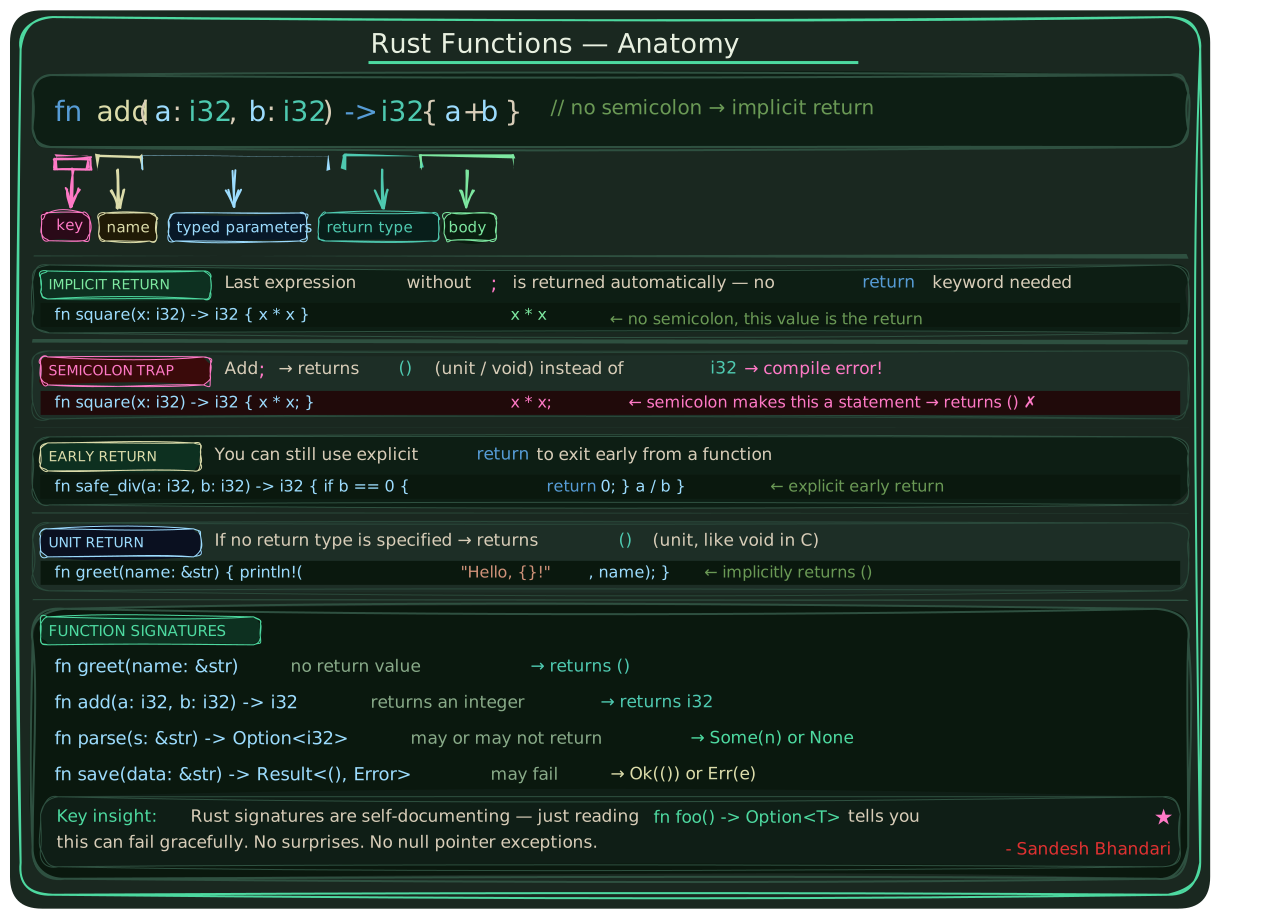
Figure: Function signatures in Rust include explicit parameter types and return type.
1fn greet(name: &str) {
2    println!("Hello, {}!", name);
3}
4fn add(a: i32, b: i32) -> i32 {
5    a + b  // no semicolon: this value is returned
6    // a + b; with a semicolon returns nothing
7}
That semicolon rule took the most getting used to. Adding one changes a return expression into a void statement. The compiler error is clear: "mismatched types: expected i32, found ()". Declaring types up front also makes functions self-documenting. You can read a signature and know exactly what it expects and gives back, without reading through the implementation.
3.3 Ownership and Borrowing
Ownership is what makes Rust fundamentally different from every other mainstream language. Every value has exactly one owner at any time. When you assign a value to another variable, ownership moves to the new one and the original is no longer valid.
1let name = String::from("Sandesh");
2let name2 = name;       // ownership moves to name2
3println!("{}", name2);  // works
4// println!("{}", name); // compile error - name was moved
5
6// To keep both, use clone:
7let name3 = name2.clone();
8
9// Or borrow - lend without moving:
10fn print_name(n: &String) { println!("{}", n); }
11print_name(&name2);     // lend temporarily
12println!("{}", name2);  // original still alive
This eliminates use-after-free and double-free errors, which are common in C and C++ and cause crashes and security vulnerabilities. In Rust these cannot happen because the compiler enforces ownership rules at build time. You get memory safety without a garbage collector, which is why Rust is used in operating systems, game engines, and embedded systems.
3.4 Structs
Structs group related data together under a single name. They are similar to classes in Python but without inheritance. Rust does not support class-based inheritance. Methods are added separately through impl blocks.
1struct Person {
2    name: String,
3    age: u32,
4    email: String,
5}
6let mut person = Person {
7    name: String::from("Sandesh"),
8    age: 20,
9    email: String::from("sandesh@example.com"),
10};
11person.age = 22; // works because person is mut
Structs are the primary way to model data in Rust. A network packet, a database record, a user account, a game entity: all of these get represented as structs.
3.5 Enums
An enum defines a type that can only be one of a fixed set of variants. In Python you might use strings to represent states, but nothing prevents an invalid value. In Rust the options are defined at the type level and the compiler enforces them.
1enum Direction { Up, Down, Left, Right }
2let dir = Direction::Down;
3match dir {
4    Direction::Up    => println!("Going up"),
5    Direction::Down  => println!("Going down"),
6    Direction::Left  => println!("Going left"),
7    Direction::Right => println!("Going right"),
8}
The match statement forces you to handle every variant. If you add a new one later, the compiler gives you an error until you handle it. This is the feature, not a bug.
3.6 Error Handling
Rust has no exceptions and no try/except. Every function that can fail returns a Result type, either Ok with a value or Err with an error. For values that might not exist, Rust uses Option. The compiler warns you if you ignore either.
1fn divide(a: f64, b: f64) -> Result<f64, String> {
2    if b == 0.0 { Err("cannot divide by zero".into()) }
3    else { Ok(a / b) }
4}
5match divide(10.0, 0.0) {
6    Ok(result) => println!("Result: {}", result),
7    Err(e)     => println!("Error: {}", e),
8}
Failure is part of the function signature, not a hidden possibility. Anyone reading the code knows immediately whether a function can fail and must decide what to do about it.
3.7 Collections
The two main collection types in Rust are Vec and HashMap. Vec is a growable list, equivalent to a Python list. HashMap is a key-value store, equivalent to a Python dictionary. HashMap does not preserve insertion order because it is optimized for fast lookup, not ordering.
1let mut numbers = Vec::new();
2numbers.push(1); numbers.push(2); numbers.push(3);
3println!("First: {}", numbers[0]);
4
5use std::collections::HashMap;
6let mut scores = HashMap::new();
7scores.insert("Sandesh", 95);
8scores.insert("Alice", 87);
9println!("{}", scores["Sandesh"]);
3.8 Iterators
Rust iterators let you transform and filter collections by chaining operations. Call iter() on a collection, chain map and filter, then call collect() to get the result back as a Vec. Iterators are lazy, meaning no work happens until collect() is called.
1let numbers = vec![1, 2, 3, 4, 5];
2
3let doubled: Vec<i32> = numbers.iter()
4    .map(|x| x * 2).collect();
5
6let evens: Vec<&i32> = numbers.iter()
7    .filter(|x| *x % 2 == 0).collect();
8
9let result: Vec<i32> = numbers.iter()
10    .filter(|x| *x % 2 == 0)
11    .map(|x| x * 2).collect(); // [4, 8]
Lazy evaluation means you can chain many operations without creating intermediate collections in memory, which matters for performance with large datasets.
3.9 Threads
Threads let you run multiple pieces of code at the same time. The output order between threads is not predictable, and that is expected, not a bug.
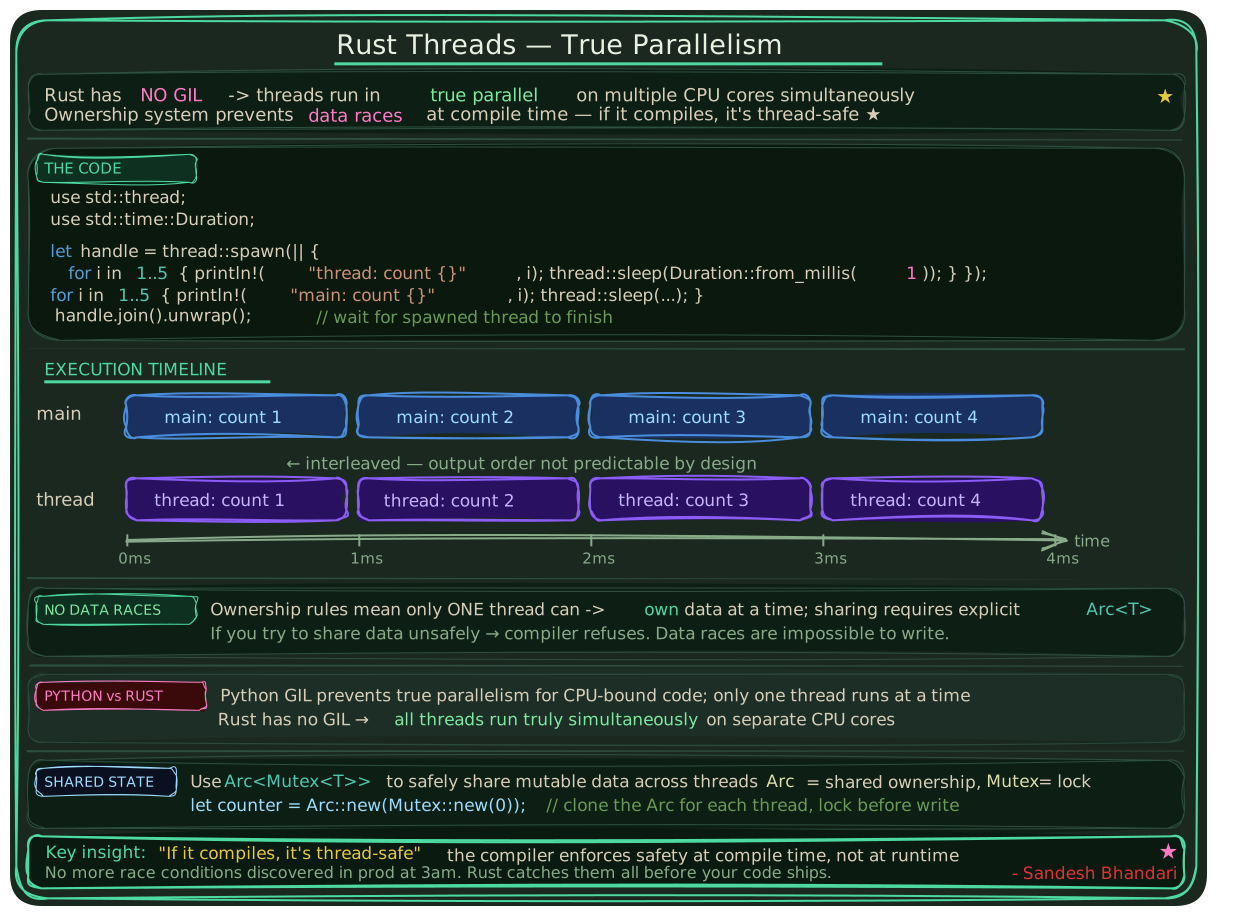
Figure: Rust threads run in true parallel. Ownership prevents data races at compile time.
1use std::thread;
2use std::time::Duration;
3
4let handle = thread::spawn(|| {
5    for i in 1..5 {
6        println!("thread: count {}", i);
7        thread::sleep(Duration::from_millis(1));
8    }
9});
10for i in 1..5 {
11    println!("main: count {}", i);
12    thread::sleep(Duration::from_millis(1));
13}
14handle.join().unwrap();
In Python, the Global Interpreter Lock prevents multiple threads from running Python code in parallel on CPU-intensive tasks. Rust has no such restriction. The ownership system guarantees that two threads cannot accidentally modify the same data at the same time.
3.10 Async and Await
Async is about waiting efficiently, not running in parallel. Threads run things simultaneously on different CPU cores. Async runs tasks on the same thread but switches between them while they wait for I/O.
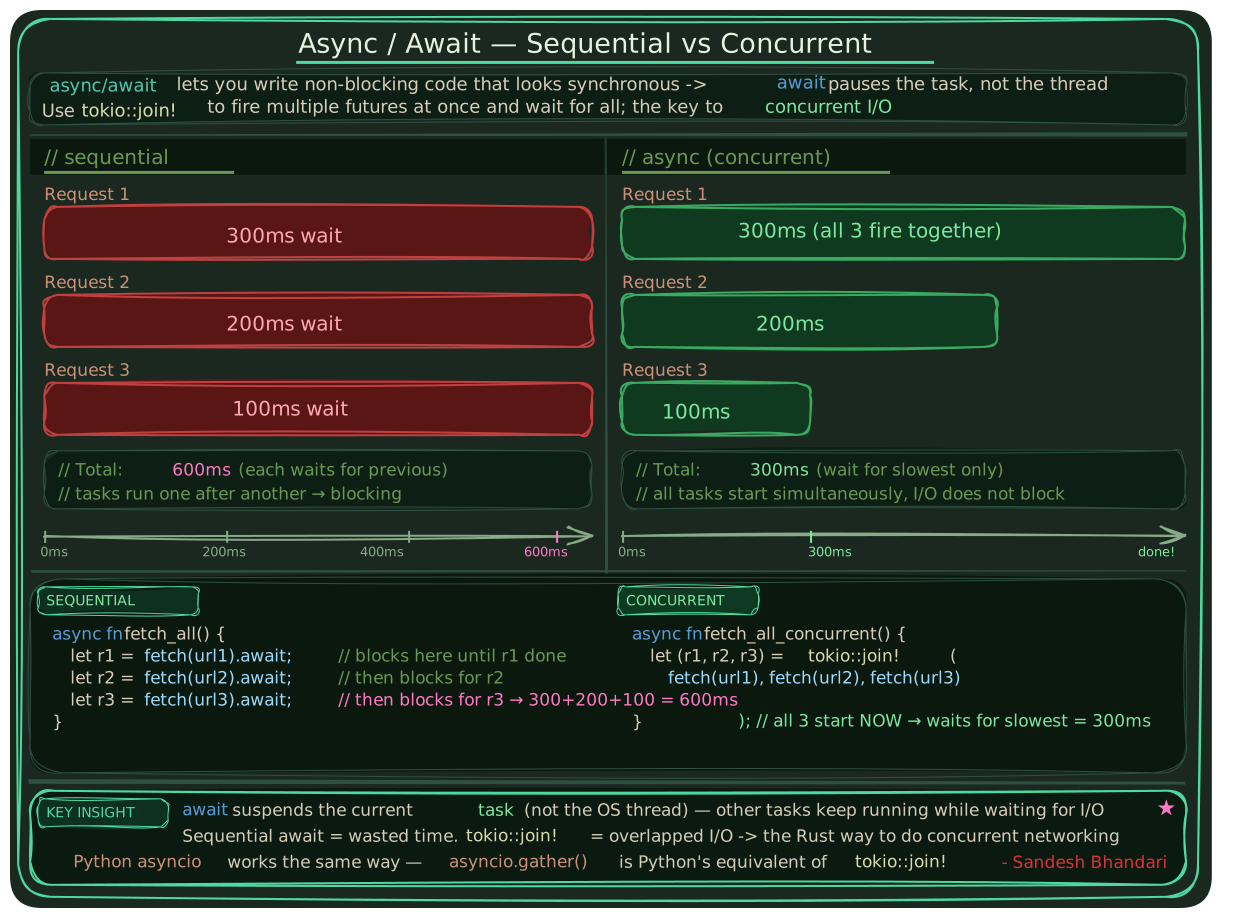
Figure: Tokio runtime for async tasks. Task 2 finishes first because it waits less.
1use tokio::time::{sleep, Duration};
2
3#[tokio::main]
4async fn main() {
5    // Both tasks start at the same time
6    let t1 = tokio::spawn(async {
7        sleep(Duration::from_millis(100)).await;
8        println!("Task 1 done"); // prints second
9    });
10    let t2 = tokio::spawn(async {
11        sleep(Duration::from_millis(50)).await;
12        println!("Task 2 done"); // prints first
13    });
14    t1.await.unwrap();
15    t2.await.unwrap();
16}
Rust needs a runtime to execute async code. The most widely used one is Tokio. Async is the standard approach for high-performance network services in Rust: web servers, database drivers, message queue consumers, and gRPC services all use it because most of their time is spent waiting on I/O rather than doing CPU work.
4. Rust vs Python: Key Differences
Coming from Python, these were the concepts that required the most adjustment.
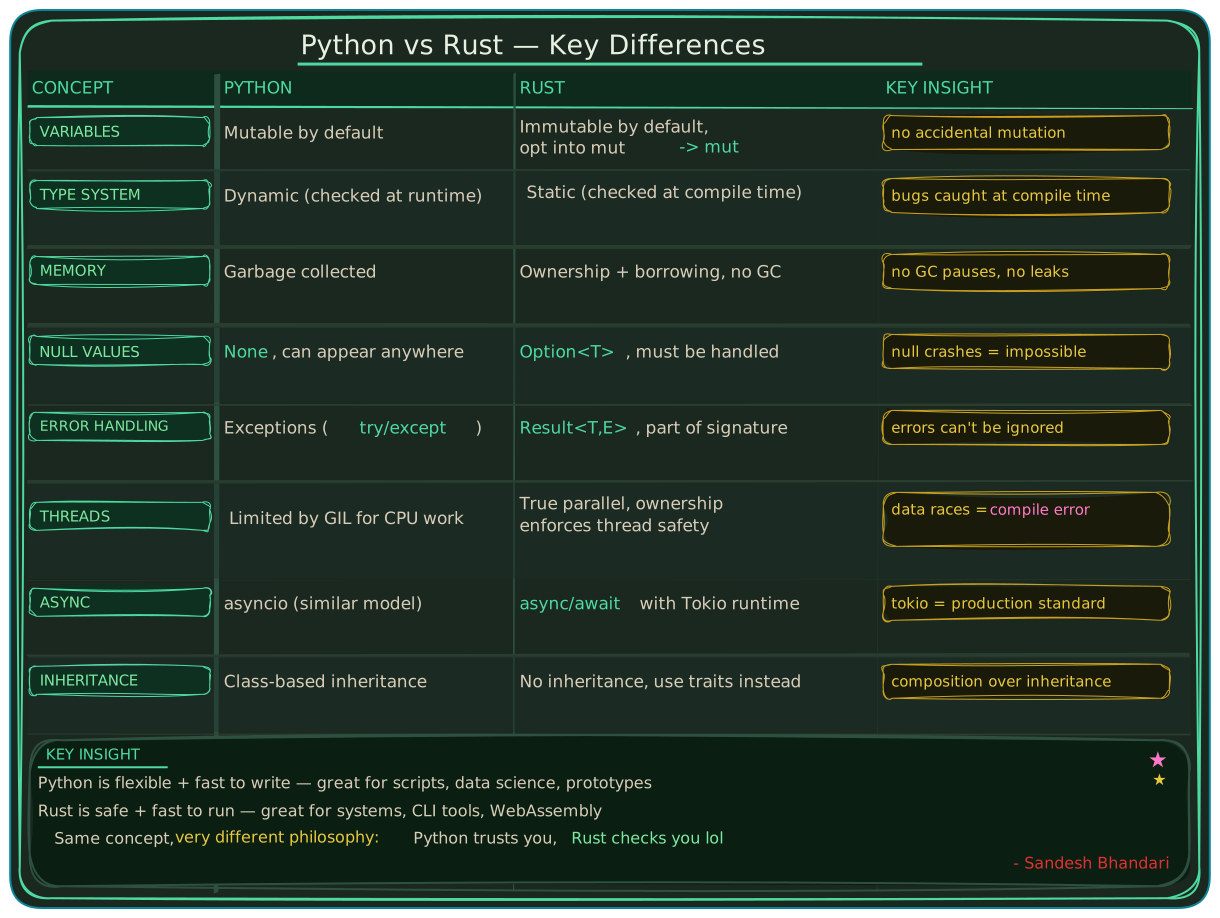
Figure: Key differences between Python and Rust.
5. Development Process and Mistakes
5.1 Git Setup and the target Folder Problem
The first issue was that Rust's build folder, called target, got committed to GitHub on the first push. The target folder contains all compiled output and can be hundreds of megabytes. It should never be tracked.
1# .gitignore - ignore target/ at any depth
2**/target/
3
4# Remove already-committed files:
5git rm -r --cached 01_variables/target
6git add .
7git commit -m "chore: remove tracked build files"
5.2 Mistakes Along the Way
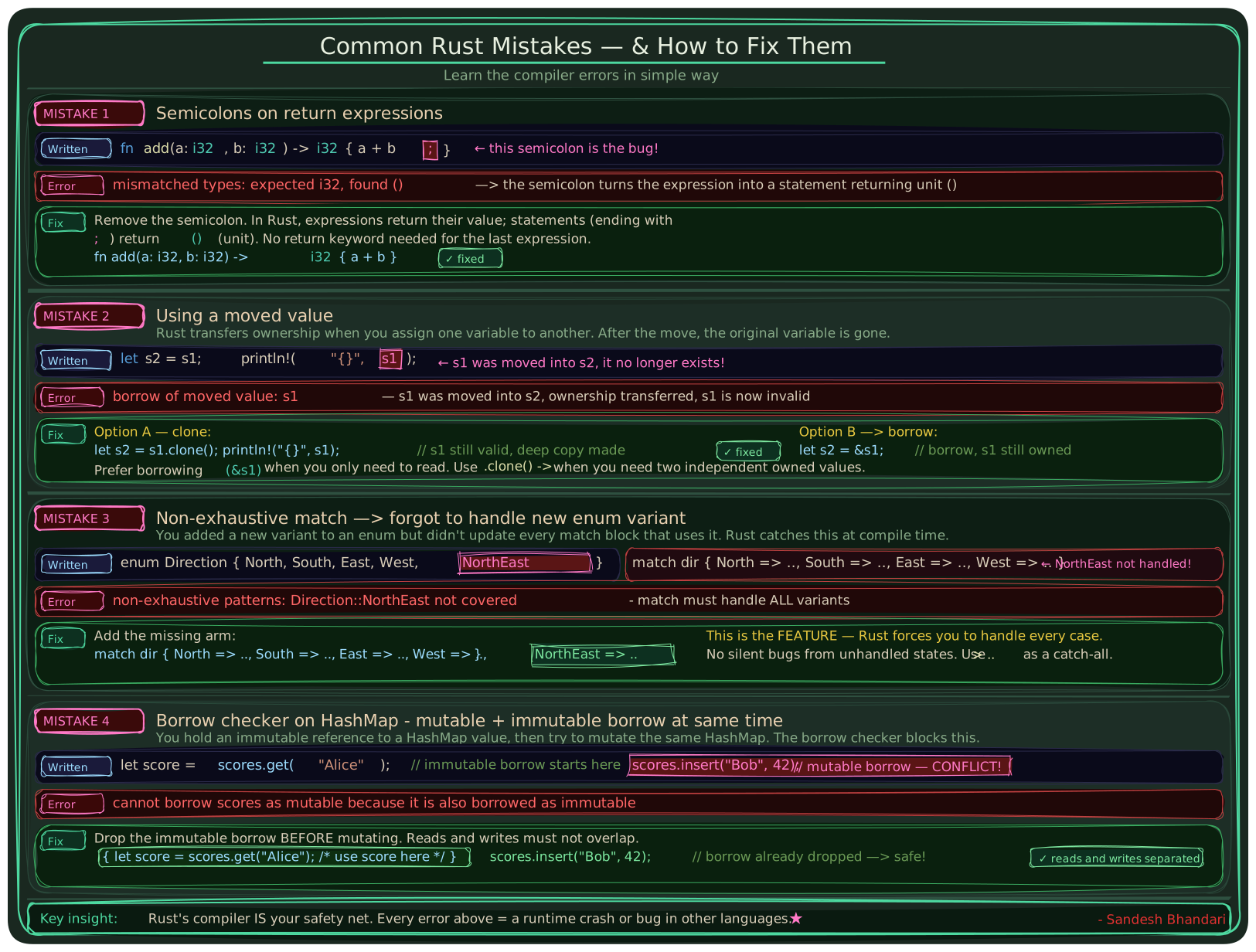
Figure: Four common Rust mistakes and how to fix them: semicolons on return expressions, moved values, non-exhaustive match, and the borrow checker on HashMap.
6. Takeaways
The compiler changed how I think about code. Coming from JavaScript where you find out something is wrong when it throws at runtime in the browser, or Python where it crashes mid-execution, having a compiler stop you before anything runs and then explain itself precisely is a different experience. And yes we have AI now, Copilot predicts half of what we are about to type, but that is different, that is autocomplete. The compiler actually understands what your code means and tells you why it is wrong. The errors are not vague and they tell you what broke, which line, why the rule exists, and sometimes exactly what to change.
The ownership model was the hardest shift and the most lasting one. A value belongs to exactly one thing at a time and moving it transfers that ownership completely, the original is just gone. It can feel like hassle at first, but that constraint is intentional and helpful. Rust makes memory ownership visible in a way nothing else.
If you are starting out the official Rust book is genuinely the best place to begin, it is free, well written, and takes you through everything properly. You can find it at doc.rust-lang.org/book.
Source code: github.com/sandesh-8622/my-rust-progress
Sandesh Bhandari, 2026